Onboarding Script
This is an example of a script that we have found success with. However, you should feel free to create one that you feel comfortable with.
Each section should be copy and pasted one at a time, with headings formatted as Bold and Italic and giving the engineer ample amount of time to read through and think about the sentences they're reading. Be careful not to overwhelm them by posting too much at once.
Before you begin, be sure to prepare a dogfooding challenge and quiz for the engineer. They will be used later in this script:
Manager's Note:
During the example script below, we have the engineer complete a quiz and a dogfooding challenge. We consider both to be important to the onboarding process and recommend creating them before starting.
Welcome Notes
Welcome to the team! I'm ${yourName}, and I ${whatYouDo} here at GVNG. Let’s get you started with the onboarding process.
Please note: all time related to GVNG, even if it isn’t direct coding, should be logged on Upwork.
Manager's Note:
Please take this moment to ensure that you have verified your @gvng.com email address.
Also be sure to track when Daylight savings occurs in the United States. Set a reminder a few days before the working hours shift forward or backward an hour.
Moving on!
Check-Ins
Great! Now what we’ll do is have you set up a time with $manager for your Weekly Check-in. This is a 45 minute meeting between you and $manager that takes place every week. Let me go through what they're all about:
Our Check-in’s:
We use the Check-in meetings to see how engaged our engineers are.
If an engineer comes to a Check-in every week without much to discuss, we become concerned that they are not as engaged as we would like. The Check-in functions as your opportunity to speak with us about anything that is important to you. This can be about your work or questions pertaining to personal development.
We will also use Check-in’s as an opportunity to provide you with feedback. We are here to help guide you with your work at GVNG, and we are also interested in your overall progress as an engineer.
Every day when you sit down and do work here at GVNG, think about the challenges you face. Think about what you would like to see change, or what you could be doing to make things change.
In the end, the Weekly Check-in’s are only going to be as good as you can make it. You have to bring your own contributions because ultimately, they are all about you.
With that all said, does $yourPreferredTime work for you?
Weekly Team Meetings
These are 1 hour meetings that take place on $date at $yourPreferredTime in the #dev channel.
Please note that these meetings are mandatory.
These meetings are strictly text-based and do not require you join any platform. Just be present in the #dev channel at the allotted time. These meetings function as a method to get everyone on the team on the same page for the week. This can be used to pinpoint or address the previous week's pain points or successes, as well as address any areas of communication that need improvement.
Manager's Note:
The time that these meetings take place is entirely up to you. We do recommend that they take place at the beginning of the week to maximize their effectiveness.
Standuply
Manager's Note:
We have had great success with Standuply as it has allowed us to form a way for engineers to structure their day, but more importantly plan. It forces them to think in terms of input and output as a daily routine.
This functions in a different way for the manager. With Standuply we can see what they have worked on, plan to work on, if their daily plan succeeded, or if it failed and why.
The uses this tool provides is truly invaluable.
I added you to Standuply, so you’ll now get reminders to fill out the reports below at different times of the week or day.
There are three different reports, please note that completion of all reports is mandatory.
- Daily Standup Report
- Weekly Dev Report
- Weekly Hour Log Report
The Daily Standup Report
This takes place at 9am PT every weekday, you will have 15 minutes to respond, so you can choose when you submit your updates.
This report is what you use to set your goals for the day.
Here is an example of the Daily Report:
How many PRs have you approved since the last standup?
3
How many PRs have you rejected since the last standup?
1
Keeping the above in mind, what do you plan to accomplish before the next Standup? Do not include reviewing PRs as part of your answer.
I will be adding tests for saving assignment HTML, then I will create the GET endpoint for getting the assignments’ files
Look at your plan from the previous standup. Did you successfully complete it?
Yes
This report is a critical representation of the work that you will put in on that day, as well as the work that you have done the day before.
Notice the first two questions:
- How many PRs have you approved since the last standup?
- How many PRs have you rejected since the last standup?
It is required that all engineers review at least on PR per day. There should be no reason that you enter 0 for both questions unless there are no PRs to review. If there are no PRs to review, be sure to note that in your Daily Report 👍
Let’s talk about the 3rd question:
Keeping the above in mind, what do you plan to accomplish before the next Standup? Do not include reviewing PRs as part of your answer.
^ The purpose for this question is to allow you to set an attainable goal for you to complete during the given workday.
notice that I highlighted “complete”
Answers to this question need to be tangible results that you will do by the end of the day.
The definition of tangible is “substantially real : material”
That means you should be setting goals such as “create a PR”, “Deploy XYZ”, “research and create document with findings”, etc
Answers that you should never give us are intangible goals.
These can range from “work on XYZ”, “Look up ticket”, “Think about plan XYZ”, etc
For example, if you were to disappear for a week, all that I would have would be “I will work on XYZ” and I wouldn’t have anything like a PR or document to see as a representation of your work.
Does this make sense?
The last question for our Daily Standup:
Look at your plan from the previous standup. Did you successfully complete it?
^ This is a place for you to gauge your effectiveness for each previous day.
Did you complete your previous day’s goals? Great!
Did you not? Ok, what happened and how can you plan to improve in the future?
For example:
Look at your plan from the previous standup. Did you successfully complete it?
No, I realized that I did not take $function into consideration. After this realization I went back into my work and found other areas that I had mistakenly overlooked. I have written down a list of things that I will be sure to do each time before I submit a new PR to prevent this happening in the future.
There’s nothing wrong with being wrong. There is everything wrong with being wrong and not accepting accountability.
That’s one thing I want you to know about working here.
You’re going to mess up.
That’s ok.
What matters is how you grow from it.
Weekly Dev Update
You will have 4 hours to complete this report and it starts at 9am on Monday. In this Standuply Report are 3 questions. I will list them and go into detail on each of them below.
In your own words, what did you complete last week?
^ This is exactly what it sounds like. I want you to tell me what you completed last week. This means instead of giving me links to PRs, you give me your thoughts on what you completed last week.
How has your work impacted GVNG as a whole?
^ This is also inline with your thoughts on the system of GVNG. Show me that you understand what your work has impacted.
What was the biggest obstacle you faced last week?
^ Was there an obstacle that you didn’t plan for? New information that slowed down progress? Let me know here.
Do you have any questions about the above?
Weekly Hour Log Report
The Weekly Hour Log Report begins on Friday at 4pm PT and ends 24 hours after. Please use this to report the hours you spent on specific projects as well as the total hours you’ve logged to upwork.
Here is a good example of a response:
Please enter your project hours from last week.
Format: [gitHubProjectName](link): INT Bugs / Misc: INTBugs / Misc: 21
How many hours were logged to Upwork?
Format: INT38
When reporting the project you’ve worked on in the first question the name of the project you use should be the one that is used in #dev-projects
Any questions?
Slack Communication
Manager's Note:
Below you will find references to new Slack channels that may not be in your organization. You can learn more about these in our Slack page.
As you no doubt have seen, we have many different channels that exist here in the Slack workspace. I'll give you a rundown of what each channel is for:
#dev
General purpose channel for team wide collaboration, communication, and meetings
#dev-group-$Number
This is a channel where your group teammates discuss relevant tickets and projects that are assigened to the group.
#dev-backend / frontend
Group discussion of back-end / frontend work
#dev-ooo
If you are going to be out of town, it is your responsibility to post the exact dates that you expect to be out here in this channel.
examples:
- I will be out of office 7/20, 7/21, and 7/22 (vacation)
- I will be out of office today (sick)
#dev-bugs
Manual reporting of urgent bugs to the dev team that should be handled immediately
#dev-errors
Automatic error reporting
#dev-notice
App integrations around the status of tickets and deployments
#dev-prs
A channel to post pull requests, and quickly communicate about those PRs in a thread
#dev-qa
General purpose channel for communicating about anything QA related
#dev-random
Discuss anything, with a focus on dev related topics
Error reporting
Do not create a post to discuss an error, or comment in the error's thread in the #dev-errors channel. Instead, link the error in another post inside another relevant channel such as #dev or your groups channel to discuss the error there.
Using Private Messages (DMs) to talk about work
When another engineer asks for assistance, the thought “someone else will help them out, I’m too busy right now” can be prevalent. This can lead to no one answering the question, making the engineer think they need to privately message someone for assistance.
This should be avoided at all costs.
If you and another engineer are discussing a topic and are unable to come to a solution, a public conversation allows both of you to quickly include someone else. That engineer can read the previous conversation and get up to speed quickly. Public conversations can also serve as documentation. Someone searching for a term related to that conversation may find that it helps them to understand the problem they are currently facing.
Effective Communication
We are social creatures, so it makes sense that we want to make sure that there is someone to talk to before we send a post out into the void of a channel.
ex. "Hey, has anyone encountered problem X?"
This may seem like a rather miscellaneous question, and you'd be right. What exactly is wrong with miscellaneous questions?
They waste time and space.
With miscellaneous questions, you can expect the conversation to flow like this:
[12:01] Dev 1: "Hey, has anyone encountered problem X?"
[12:03] Dev 2: "Oh yeah, that's a doozy."
[12:03] Dev 1: "How did you figure it out?"
[12:06] Dev 2: "I did fix=XYZ."
[12:08] Dev 1: "I've already tried that, didn't work."
[12:12] Dev 2: "Link me your PR"
[12:17] Dev 1: "Done"
[12:24] Dev 2: "Oh wait, your PR is for repo ABC! That's why my solution didn't work. Try fix = ABC"
[12:30] Dev 1: "You're right! That did the trick, thanks!"
That's 9 posts in a channel if they don't use threads, and over 30 minutes to solve an issue that had a quick fix.
Let's see what the conversation might look like if we cut out miscellaneous questions and instead used concise, well-thought out communication:
[12:01] Dev 1: "Hey @dev2, @dev3: I'm working on LinkToPR in Repo ABC, I've tried fix=XYZ,FIX=X. Am I approaching this the wrong way?
[12:02] Dev 3: "Did that last night, use fix=ABC"
[12:03] Dev 2: "Agree with @Dev 3. Fix=ABC is the solution."
[12:05] Dev 1: "Fix=ABC worked! Thanks!"
That took up 4 lines of code and lasted 5 minutes. Effective communication builds the team and helps the engineer learn how to communicate better.
Engineering Duties
Status & Notifications
Since we require you to be active from , please be sure to keep your status on Slack active. As any @mentions you may receive have the chance to nullified by an "Away" status.
I would also like for you to set the notifications for this Weekly-Check-In channel to "every new message".
Always Have a Plan
When faced with a problem, most engineers will launch right into a solution. Rare is the engineer who will set down and weigh out the pros & cons of a particular solution. In doing so, they might happen a better solution than the one they initial came up with.
Not every task requires a plan. Fixing the margin on a button or creating a simple CRUD API endpoint do not warrant the need for a plan. Implementing a new reusable component? Plan it out. Building a major new feature for the site? Plan it out.
Project Planning
It is important that everything be considered when planning a project. Below are questions that you need to answer during the planning phase of a project.
The answers should be written down on a document and shared with management as soon as it is created.
What is the objective?
- Why?
- Who is asking for this?
- What happens if we don't do this?
What is the current state of the system this project will affect?
- How does it work?
- What is the system flow step by step?
What are different ways to achieve the objective?
Option 1
- What changes need to me made to:
- Front End?
- Back End?
- User documentation?
- Business itself?
- What are the advantages?
- How much code needs to be changed?
- How quickly can this be done?
- How many people need to be involved?
- What are the operational changes? (database, hosting, etc)
- What are the risks?
- Can this be reversed?
- What kind of maintenance is involved?
- Would a new developer or user be able to understand this?
- Will this cause technical debt?
Option 2
...
Option 3
...
What is the recommendation moving forward?
- Which option is best?
- Why?
- Which advantages are most important?
- Which drawbacks are acceptable?
What are the next steps?
- What tickets need to be created?
- How many hours will each ticket take?
- What is the estimated date to deployment of the project?
References
- Are there related images?
- Related links, e.g GitHub, Slack, Figma, Google docs, etc?
Do you have any questions about the above?
Project Division
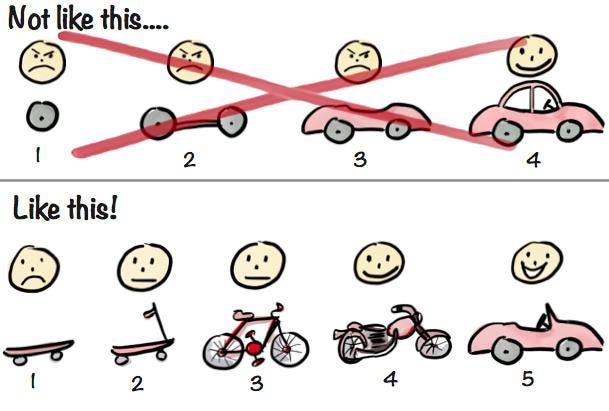
It is important to identify the minimum needed to get the project started on production.
This is so we can view the work in (almost) real time. Where we can get better feedback and improve our implementation.
As the photo above implies, we want to build a complex project one usable part at a time. We don't want to wait for the whole car to be built only to find out there's something wrong with it.
Here is a helpful guide that will help you divide and reform your project into deployable pieces:
Divide and Conquer
The division of the project into sections should depend on the type of the project.
Some categories to think in:
- Project Functionality
- BE/FE
- Repositories
- Permissions
- Data
- Secrets
Splice and Reform
Utilizing your knowledge of how the project is supposed to work, find the minimum from all of the divided parts of the project you need to have in order to deploy a part of the project.
This will be your first task (or sub-project) that you will submit an ETA on.
Use your knowledge of what is important about the project to determine what should be deployed first.
Self-sufficient
Even the most well-intentioned engineer has a bad day, resulting in a choice that accumulates debt at a higher interest rate than others.
You should be self-sufficient and adept at navigating existing code that you did not author. Turning to others for help is actively encouraged, but only after first trying your best to comprehend on your own first.
Incremental Development
As mentioned above, by delivering small, incremental changes, we allow for quicker feedback.
Large parent branches that are separated from the day-to-day work of the rest of the organization can feel like a necessity when developing features that can take weeks to implement. That is, until some bug fix has been made upstream on the existing feature that is being actively worked on in a silo. It takes a diligent engineer to spot that upstream bug fix and make sure it is properly incorporated into the parent branch so that bug is not reintroduced when the new feature work is launched. When it comes time to merge that parent branch into the main branch, a nasty bug can result in reverting week's worth of work. The resulting haystack can be quite frustrating to wade through, demoralizing a team upon what was supposed to be a big launch day.
To avoid silos and maintenance nightmares, small, incremental changes are required.
Bugs
Whenever a bug is discovered, the engineers responsible or the relevant team need to address it immediately. If you view the bug but are unable to address it yourself you should @ other devs in the #dev-bugs to get their attention.
Permissive > Prescriptive
It is not uncommon for an engineer to ask for permission to make a small change. Not used to the empowerment that comes with working at a start-up, contract workers tend to ask their managers if it's okay to use tool X. It is important for them understand that they are empowered to make changes, and should be encouraged to discuss those changes with their team if needed.
There are exceptions of course. Can we use this plugin? You probably don't need to ask. Can we update our whole build process, causing countless man hours to be wasted on upgrading something that doesn't really need an upgrade? It's a possibility but it needs to be discussed first.
Another important lesson to learn is deciding when to discuss a small change vs simply implementing that change and submitting a pull request.
30-60 minutes on a PR might be a better use of time the same 30-60 minutes spent discussing it on Slack.
Worst case, the pull request gets denied and a small amount of time was spent on something that ultimately was not worthwhile. That is okay. It’s a fine line between being proactive and knowing when to ask for permission.
Being consistent about your goals and communication will help in this area.
Dogfooding
This is where we would recommend introducing the engineer to your company's approach to dogfooding.
Be sure to give the coding guidelines another careful read and when you have a minute, check out this blog
Like before, we’ll continue when you have completed the above :thumbsup:
Manager's Note:
Consider this your chance to show the engineer what the app should look like from a customer’s perspective.
Show them what the app should look and function like. Give them an idea of how customers will navigate, message doctors, create meetings, and more.
Required Reading
Here's a list of the articles we have our new engineers read. Please take your time to read them all and let me know when you have completed all of the below:
- Why This Opportunity Solution Tree is Changing the Way Product Teams Work
- Hidden Documentation
- Optimism
- Law of Triviality
- Why do most top performers have the highest count of commits and pull requests?
- Choose Boring Technology
- Answer Questions Well
- Rob Pike's 5 Rules of Programming
- It's time to start writing
- The Wrong Abstraction
- Why does writing matter in remote work?
- 3 steps to add tests on existing code when you have short deadlines
- Goodbye, Clean Code
- Idempotence Now Prevents Pain Later
- Why Your Links Should Never Say “Click Here”
- What I Wish I Knew About Onboarding Effectively
- How to communicate effectively as a developer
If the dev is BE: Give them Fullstack Node to read. If the dev is FE: Give them Fullstack React to read.
Quiz
You’re almost done! Taking all of the information you’ve learned above, please answer these questions on our form: https://forms.gle/xT6c5v4yVATd5bWm6
Manager's Note:
This is where you have them fill out a form that you believe best showcases their understanding about their workspace and what is expected of them.
It can be a Google Form, Typeform, or any other form of polling that you choose to use. The length and amount of detail in this quiz is entirely up to you as well.
It is important for you to pick necessary aspects of the job that you want to be 100% clear with the employee on. This can be used as a reference later on as well.
Introduction to Team
We would like to introduce you to the team and have you give them some information about yourself. Write a few sentences about yourself and post in our #dev!
Get Them Started
You’re all set! Welcome to GVNG!
Manager's Note:
Once all of this is done, the engineer will be setup to start their first PR with you.
It is recommended that their first PR consist of a simple problem that brings them through the engineering lifecycle and gets them further acquainted with their surroundings.
After this, you will have a fully integrated engineer working on your team. Congratulations!